Страница 1
HyperX Clutch Quick Start Guide Wireless Gaming Controller Overview A B F G C H D E B I J K A Action buttons D Home button G Triggers (L2/R2) J 2.4GHz wireless adapter B Analog sticks (L3/R3) E Mode selection switch H U…
Читать страницу
Карточка инструкции: Геймпад беспроводной/проводной HyperX Clutch Wireless. Документ содержит 19 страниц. Раздел: Контроллеры и геймпады. Бренд: Hyperx. Доступны оглавление, просмотр по страницам и PDF для скачивания.
Раздел: ТВ, консоли и аудио / Консоли и видеоигры / Контроллеры и геймпады
Бренд: Hyperx
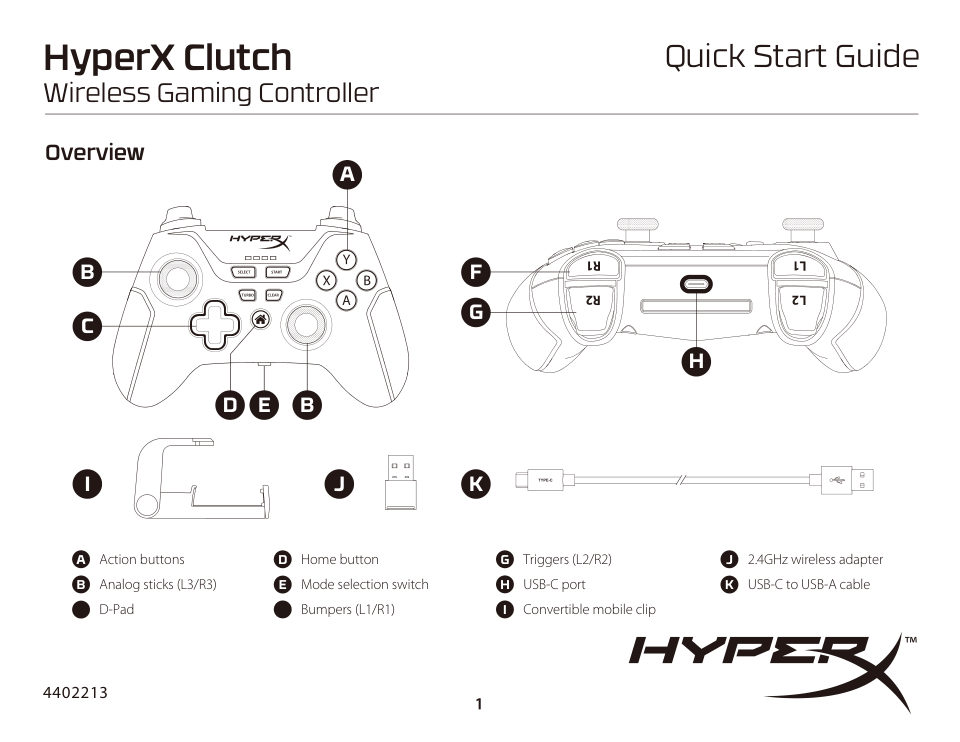
HyperX Clutch Quick Start Guide Wireless Gaming Controller Overview A B F G C H D E B I J K A Action buttons D Home button G Triggers (L2/R2) J 2.4GHz wireless adapter B Analog sticks (L3/R3) E Mode selection switch H U…
Читать страницуSetup Charging LED STATUS BATTERY LEVEL ≤ 25% 26% - 50% 51% - 75% 76% - 100% It is recommended to fully charge the controller before first use. Mode Selection
Читать страницуPairing and Connecting 2.4G 1. Set the mode selection switch to 2.4G. 2. Connect the 2.4GHz wireless adapter to the PC. 3. Tap the Home button. The controller will power on and attempt to connect to the 2.4GHz wireless…
Читать страницуENGLISH 3. On your Bluetooth-enabled device, search and connect to “HyperX Clutch.” Overview A - Action buttons Usage B - Analog sticks (L3/R3) Power - 2.4G or Bluetooth Mode C - D-Pad Press the Home button to power the…
Читать страницуFRANÇAIS 3. Sur votre dispositif compatible Bluetooth, recherchez « HyperX Clutch ». Présentation A - Déclencheurs Utilisation B - Manettes analogiques (L3/R3) Alimentation - mode 2,4G ou Bluetooth C - Croix directionne…
Читать страницуSTATO LED LIVELLO BATTERIA DEUTSCH ≤ 25% Übersicht 26% - 50% A - Aktionstasten 51% - 75% B - Analog-Sticks (L3/R3) C - D-Pad 76% - 100% D - Home-Taste In occasione del primo utilizzo, si consiglia di effettuare un ciclo…
Читать страницуBluetooth J - Adapter bezprzewodowy 2,4GHz 1. Stelle den Moduswahlschalter auf Bluetooth. K - Przewód USB-C do USB-A 2. Halte die Home-Taste 6 Sekunden lang gedrückt, bis die LEDs schnell durchlaufen und damit den Koppl…
Читать страницуMasz pytania lub problemy z konfiguracją? 2. Conecta el adaptador inalámbrico 2.4Ghz a tu PC. Skontaktuj się z działem pomocy technicznej HyperX na stronie: 3. Toca el botón Home. El control se encenderá e intentará http…
Читать страницу