Страница 1
APP soundcore Google Play and the Google Play logo are trademarks of Google Inc. Apple and the Apple logo are trademarks of Apple Inc. Download the soundcore app to experience adaptive noise cancelling, ambient sound mo…
Читать страницу
Карточка инструкции: Беспроводные/проводные наушники Anker Soundcore Space One Pro белый 2024. Документ содержит 11 страниц. Раздел: Наушники и гарнитуры. Бренд: Anker. Доступны оглавление, просмотр по страницам и PDF д…
Раздел: ТВ, консоли и аудио / Аудиотехника / Наушники и гарнитуры
Бренд: Anker
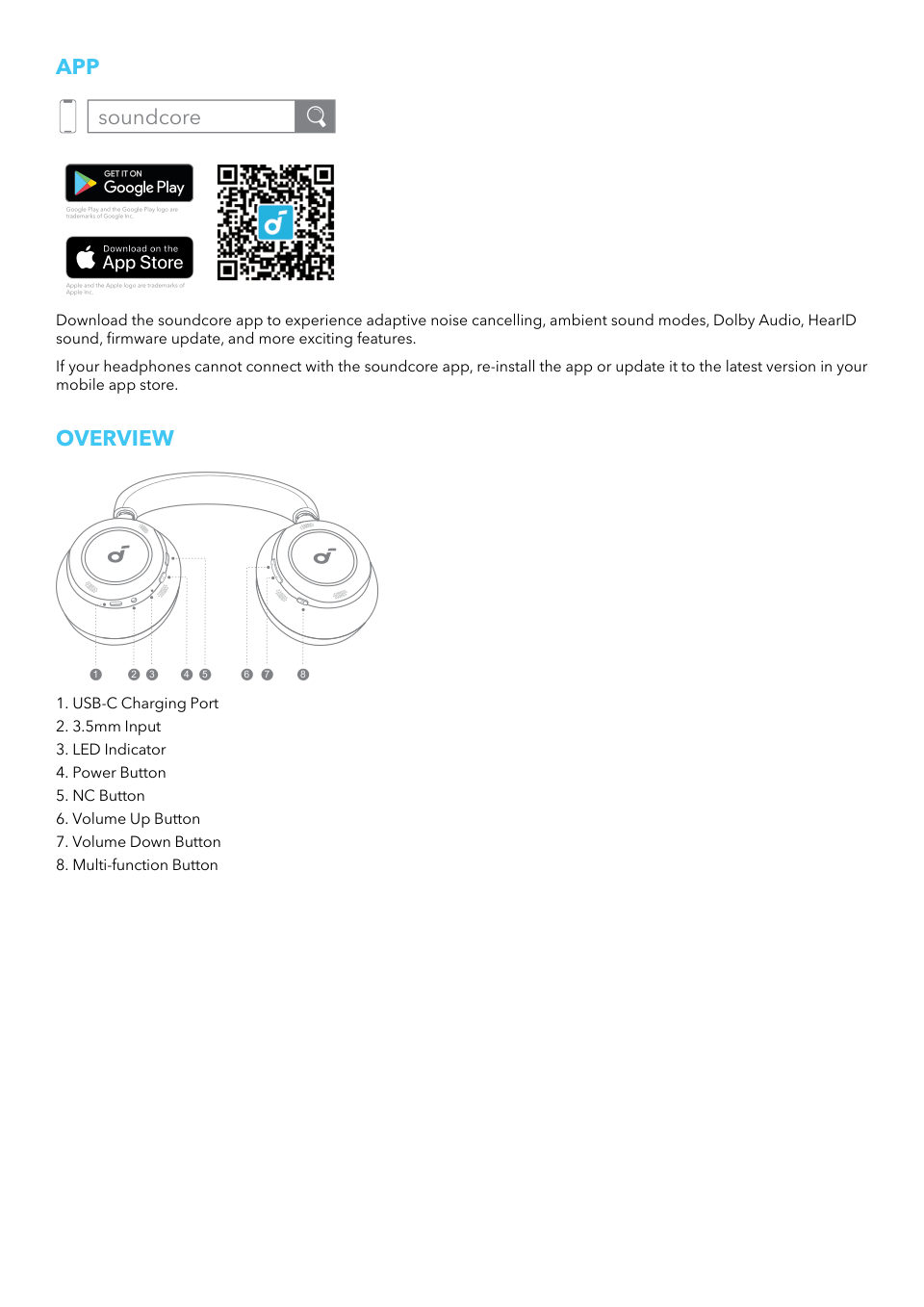
APP soundcore Google Play and the Google Play logo are trademarks of Google Inc. Apple and the Apple logo are trademarks of Apple Inc. Download the soundcore app to experience adaptive noise cancelling, ambient sound mo…
Читать страницуFOLDING YOUR HEADPHONES 1. Turn both panels around until you can see the "L" and "R" marks. 1 2. Fold up the left panel, then rotate the right panel to the position where you can see the soundcore logo. Rotate 2 1 2 3.…
Читать страницуWEARING R L Wear the headphones with the "L" logo on your left ear and "R" logo on your right ear. Adjust the length of the headband for a comfortable fit. POWERING ON AND PAIRING 2 Android 6.0+ Fast Pair NC 1 Tapsoundc…
Читать страницуWhen the battery is running low, you will hear a voice prompt. Use the provided USB-C charging cable to connect your headphones to a power source. A full battery recharge takes about 2 hours, and 5 minutes of charging o…
Читать страницуBUTTON CONTROLS 2s ANC (Default) ×1 Transparency ×1 2s ×1 NC 2s ON ×1 2s OFF 2s ×1 Voice 2s Assistant 2s x1: Press once x2: Press twice 2s: Press and hold for 2 seconds * You can enable Normal mode in the soundcore app.…
Читать страницуNOISE CANCELLATION 1 2 1 1 To reduce ambient noise, switch to noise cancellation (default) via the NC button and customize it in the soundcore app. • Adaptive Noise Cancelling: Perform real-time calculation based on the…
Читать страницуSIDETONE With the Sidetone feature on, you will hear your own voice loud and clear when making or receiving phone calls using the headphones. *Sidetone feature is on by default. You can disable this feature via the soun…
Читать страницуLDAC 11 3 2 5 4 Enable LDAC in the soundcore app for higher-quality audio. *Only available on devices powered by Android 8.0 or later. • Use devices powered by Android 8.0 or later to experience LDAC quality sound. • LD…
Читать страницу