Страница 1
1. Connect the Hardware a. Insert the Nano SIM card into b. Connect the power adapter the slot until you hear a click. to the router. Quick Installation Guide Power Adapter Wireless 4G LTE Router Tip: Images may differ…
Читать страницу
Карточка инструкции: Роутер TP-Link Archer MR505. Документ содержит 2 страницы. Раздел: Wi-Fi роутеры 3G/4G/5G. Бренд: Tp-Link. Доступны оглавление, просмотр по страницам и PDF для скачивания.
Раздел: Сетевое оборудование / Wi-Fi роутеры и оборудование для малых сетей / Wi-Fi роутеры 3G/4G/5G
Бренд: Tp-Link
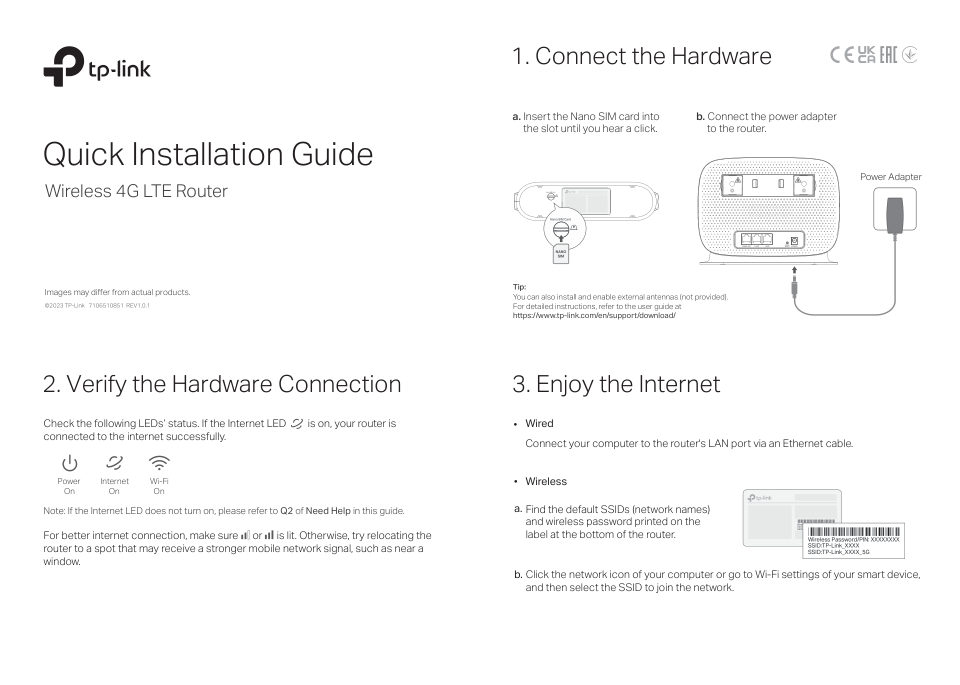
1. Connect the Hardware a. Insert the Nano SIM card into b. Connect the power adapter the slot until you hear a click. to the router. Quick Installation Guide Power Adapter Wireless 4G LTE Router Tip: Images may differ…
Читать страницуConfigure the Router via Tether App Customize the 4G LTE Router The TP-Link Tether app provides a simple, intuitive way to access and manage your router. 1. Make sure your computer is connected to the router (wired or w…
Читать страницу