Страница 1
At a Glance Power Button PartyCast Button Bluetooth Button BassUp 2.0 Button Volume Down Button Type-C Charging Port Play/Pause Button AUX Input Volume Up Button LED Light LightShow Button Installing the Strap 1 2 • Att…
Читать страницу
Карточка инструкции: Soundcore Boom 2 Plus. Документ содержит 5 страниц. Раздел: Портативные колонки и аудиосистемы. Бренд: Soundcore. Доступны оглавление, просмотр по страницам и PDF для скачивания.
Раздел: ТВ, консоли и аудио / Аудиотехника / Портативные колонки и аудиосистемы
Бренд: Soundcore
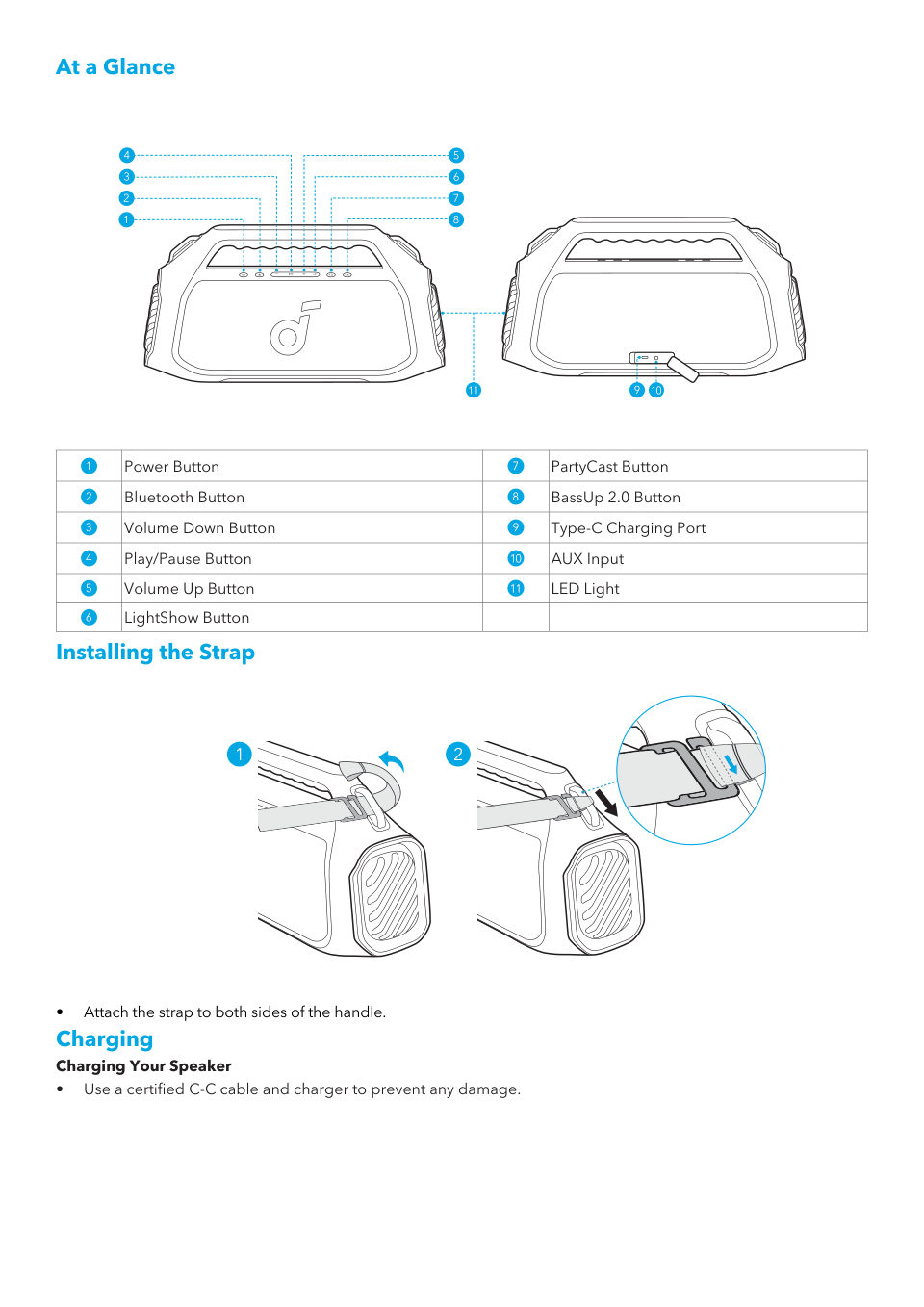
At a Glance Power Button PartyCast Button Bluetooth Button BassUp 2.0 Button Volume Down Button Type-C Charging Port Play/Pause Button AUX Input Volume Up Button LED Light LightShow Button Installing the Strap 1 2 • Att…
Читать страницуFlashing Red Low Battery Steady Red Being Charged Steady White Fully Charged Charging External Devices • Use this speaker as a power bank to charge your portable devices or accessories. Powering On/Off Press or Press an…
Читать страницуUsing Your Speaker Bluetooth Mode Press the Bluetooth button to enter Bluetooth pairing mode, then select "soundcore Boom 2 Plus" from the Bluetooth list to connect. 1 2 x1 soundcore Boom 2 Plus Press Enter Bluetooth Pa…
Читать страницу×1 1 2 Press Enter / Exit PartyCast Pairing Mode Steady White PartyCast Pairing Steady White PartyCast Connected soundcore speakers with PartyCast function can also be connected with this speaker. LightShow ×1 >2s Press…
Читать страницуsoundcore App Download the soundcore app to enhance your experience. soundcore Google Play and the Google Play logo are trademarks of Google Inc. Apple and the Apple logo are trademarks of Apple Inc. Product information…
Читать страницу